Your Company Already Tried to Build a Second Brain. It Was Called SharePoint.
Personal notes can be messy. Company memory needs ownership, access rules, trusted sources, and a clear path from knowledge to action.
When I was a CEO, my friend Tareef introduced me to Obsidian as a better way to stay organized. He described it as a “Second Brain.” That is where I started.
I understood the appeal right away. A CEO has to keep track of people, projects, customer commitments, operating decisions, risks, and ideas that rarely live in one system. In Obsidian, my notes did not have to sit in separate folders. They could link to one another, and the graph made those relationships visible. I could follow an idea without having to remember where I filed it.
The graph looked intelligent, and it was useful for writing, research, and finding ideas I might otherwise have lost. It also raised a harder question: could a Second Brain do more than show me what I knew?
Could it help me decide what to do next?
That question becomes even more important inside a company. Put organizational knowledge into a graph and the invisible structure of the business becomes visible. You can see how a client connects to a project, how a decision connects to its evidence, and how one piece of work depends on another.
Seeing the connections is interesting. They become useful when they help someone answer a question:
What should we work on next, and why?
Answering that question connects memory to action. It requires current goals, customer commitments, deadlines, dependencies, recent decisions, open risks, and some judgment about which work will change an outcome.
One person’s brain is not the company’s brain
My Obsidian vault was personal. I could write half a thought, use a nickname, or connect two notes without explaining the link because I knew what I meant. It helped me remember ideas, prepare for meetings, and keep track of unfinished work. If the structure was messy, I was the only person who had to live with it.
A company does not have that luxury. People have different jobs, different access, and different versions of the story. The system has to know the difference between an official record and someone’s notes, a current policy and an old presentation, or an approved customer claim and a good story somebody remembers. And it still has to make sense after the person who created the information leaves.
That is why I think the useful answer is both. The company needs shared memory for its records, decisions, rules, and commitments. Each person still needs a private place for rough notes, drafts, ideas, and priorities. AI can use both to help answer, “What should I work on next?” But the line matters. My private note should not become a company fact, and company information should not leak into my personal tools.
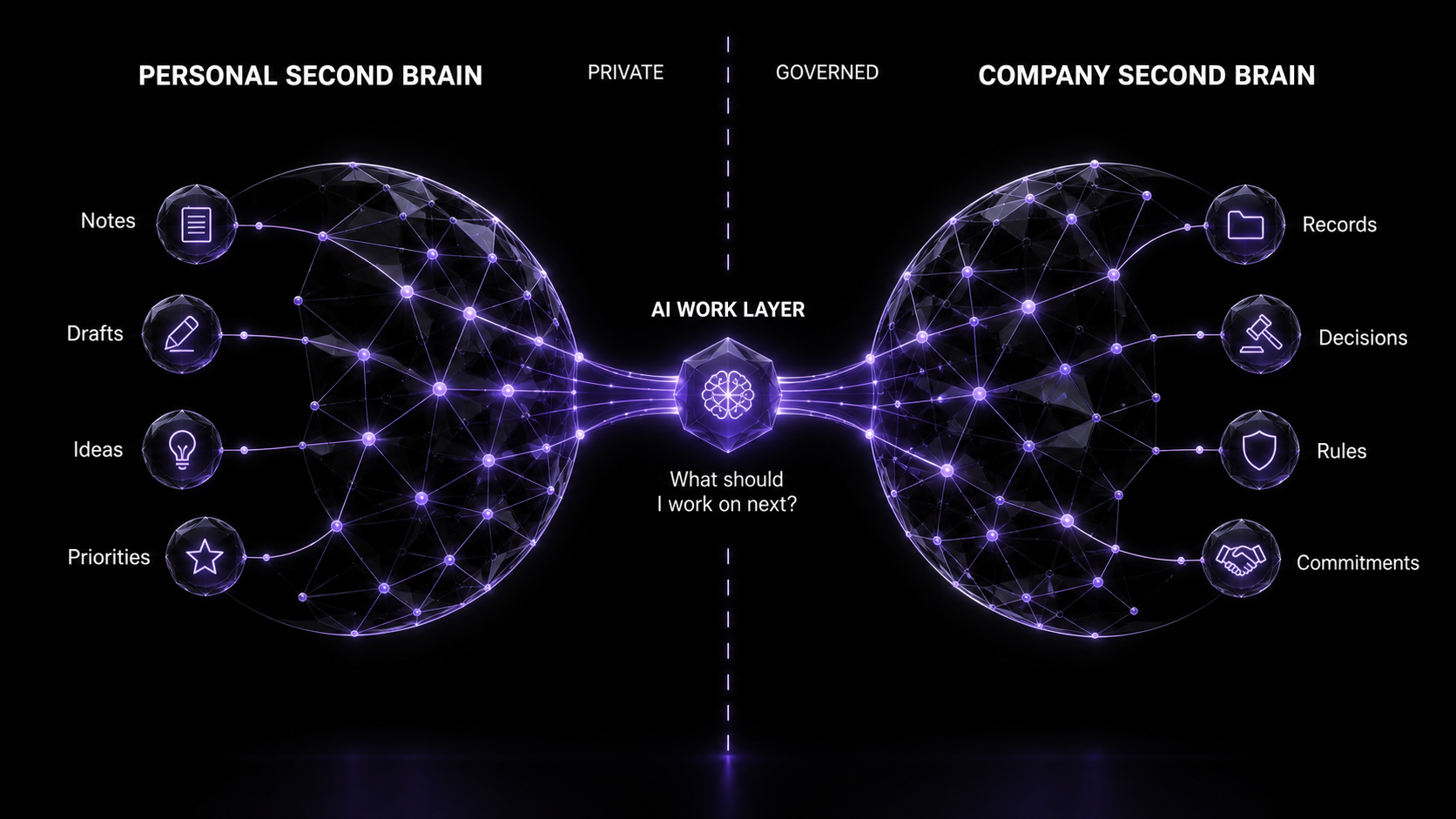
Most companies already have that information. It is scattered across shared drives, project tools, inboxes, CRM records, meeting transcripts, wikis, slide decks, and the heads of the people who have been around long enough to know where the bodies are buried. The company has plenty of information. The problem is using it as shared memory.
The graph is one way to look at the system. Most people should not have to navigate a web of nodes to use it. They need a clear briefing, recommendation, warning, or prepared piece of work. When the answer matters, they should also be able to inspect the source and reasoning.
That is why I would not begin by collecting everything the company knows. Begin with a decision or workflow that matters, then build the memory required to improve it.
AI has made retrieval look deceptively easy. Connect a model to a document repository, add a search box, and the system produces a polished answer in seconds. The demo feels intelligent. Then an operator starts asking questions. Which policy is current? Who approved this claim? Did the client agree to that scope, or was it only discussed? Does this case study support the statement we are about to publish? What changed after the last project review?
A file store can return documents that contain related words. A knowledge spine has to return context the company can act on.
A practical Second Brain should remember what the organization saved, show where the knowledge came from, and carry approved context into the work where people make decisions. Otherwise, it is an archive with a better visualization.
The file-store model breaks at the moment of execution
The usual Second Brain project begins as a storage problem. Teams gather files, improve naming conventions, move documents into a central platform, and add search. That cleanup helps, but it does not create organizational intelligence.
Files preserve artifacts. Companies operate through relationships. A proposal relates to a client, an offer, a pricing decision, a set of assumptions, and the people who approved it. A customer quote relates to a product version, a use case, a measured outcome, a permission status, and an expiration date. A strategy relates to the market conditions that produced it, the decision it replaced, and the work now governed by it.
Put those artifacts in folders and the relationships remain implicit. The employee who created them may understand the connections. The next employee has to reconstruct them. An AI system will infer them, which is useful until the inference is wrong.
SharePoint made this promise first
If you have worked inside a company for long enough, this story probably sounds familiar. In 2001, Microsoft described SharePoint as part of an “advanced knowledge workplace” that brought together team collaboration, information management, discovery, and company communication. The idea was bigger than putting files in a browser. SharePoint was supposed to help people find and use what the company knew. (Microsoft, 2001)
I do not think SharePoint fell short because it only had folders. It did not. It had content types, metadata, taxonomy, search, permissions, and workflows. Microsoft still says that making it work requires planning around users, content, classification, lifecycle, and access. (Microsoft Learn) The hard part was never buying the software. It was deciding what the information meant, who owned it, who could see it, and what counted as current.
Add AI without fixing that and we repeat the same mistake. The system finds more information and writes the answer faster, but it still cannot tell a current policy from an old deck unless we give it a way to know. A company Second Brain has to do more than add chat to SharePoint. It has to connect trusted information to the decisions and work it supports.
This problem predates generative AI. Eric Stein and Vladimir Zwass wrote about organizational memory systems in 1995. They described acquisition, retention, maintenance, search, and retrieval as parts of a system that supports learning and decisions. Memory becomes useful when an organization maintains it and puts it to work. AI now scales both retrieval and misunderstanding, which makes their argument more pressing. (Information Systems Research)
The file-store model also creates a subtle operating tax. People search for work that already exists, rebuild presentations that were already built, ask the same subject-matter experts the same questions, and make decisions without seeing the precedent that should have informed them. The cost rarely appears as one budget line. It shows up as slower onboarding, duplicated work, inconsistent claims, approval delays, and avoidable risk.
A useful Second Brain reduces that tax by carrying memory into the work itself. That is why I prefer the idea of a knowledge spine.
What the system should help people do
Does it really help? Only when it changes a repeated piece of work. A folder called “Second Brain” does not make anyone smarter. The useful test is whether the system shortens a task, prevents an avoidable mistake, or lets someone act without finding the one person who remembers everything.
Before a sales call, it should assemble the latest account history, open commitments, relevant proof, product usage, and unresolved risks. The salesperson should walk into the conversation prepared without searching the CRM, inbox, project board, and shared drive separately.
When a new employee starts, it should explain the current strategy, why the company chose it, which alternatives it rejected, which assumptions still matter, and where the source material lives. The new employee learns how the business works instead of taking a tour of its documents.
When someone writes a proposal, security response, launch plan, report, or piece of content, it should surface the approved positioning, current scope, valid customer evidence, prior decisions, and required review rules. The person still makes the judgment. The system removes the scavenger hunt and reduces the chance of using an expired claim or an old policy.
When work changes hands, it should preserve the decision trail, current state, open questions, and next action. A project lead returning after a week away should be able to see what changed. A customer support specialist should see what the company promised. A team should not lose its operating memory because an experienced employee left.
And when an AI agent performs a task, the Second Brain should provide the same boundaries a strong employee needs: which sources are authoritative, what the agent may use, what requires approval, and where uncertainty must be surfaced instead of guessed away.
The most useful application may also be the most personal question: “What should I work on next?” Answering it well requires more than a list of tasks. The AI needs current goals, deadlines, commitments, dependencies, recent changes, expected impact, and the difference between work only that person can do and work the system can handle. It should be able to say, “Prepare for Thursday’s client decision because two inputs are still missing,” not offer generic advice about focusing on high-priority work.
A system like that is more useful than a traditional Second Brain because it is built around an outcome. Company memory gives AI the context, and the workflow gives someone a place to act on the answer. Together they help a person decide what to do, understand why it matters, gather the context, and complete or delegate the work. Without reliable memory, the AI is guessing. Without a way to act, it is only talking.
Those are practical applications: prioritization, meeting preparation, onboarding, proposal development, customer support, project handoffs, compliance responses, content creation, and AI-assisted work. If the system does not make one of those workflows faster, safer, or more consistent, it is simply another repository asking to be maintained.
A knowledge spine connects truth to work
I prefer “spine” when talking about a company because a spine connects the parts and carries signals between them. It does not replace the CRM, project platform, document repository, analytics stack, or collaboration tools. It gives those systems a way to contribute to shared memory.
The spine needs a model of the business: clients, people, projects, offers, decisions, claims, evidence, policies, risks, and workflows. Each becomes something the system can identify and connect instead of a term buried in a document. A widely cited survey in ACM Computing Surveys explains why graphs work well for varied, changing data. They represent things and their relationships in a form that systems can query, check, and add to. (Hogan et al., “Knowledge Graphs”)
The spine also needs governance. Without it, the graph becomes a nice map of stale information. The system needs provenance, ownership, permissions, lifecycle state, and links to the source files. The World Wide Web Consortium’s PROV-O standard defines provenance as information about the things, actions, and people involved in producing something. (W3C PROV-O) Put more plainly, the system should answer four questions: What do we know? Why do we believe it? Who owns it? Can we still use it?
Search becomes one way to reach this context. An employee asking about a client should see active work, relevant decisions, approved proof, open risks, and the latest source material. An AI agent drafting a proposal should receive the same positioning, scope, evidence, and approval rules that a strong operator would gather before writing. The workflow should pull that context automatically instead of waiting for someone to remember five links.
Organizational memory needs a control plane
Once AI starts consuming company knowledge, information architecture becomes part of AI governance. You cannot govern an answer if you do not govern the context that produced it.
Many organizations discover that their Second Brain problem starts before AI. They do not have a clear role matrix showing who owns each responsibility and decision. They have not classified information by sensitivity. They also lack an access matrix that defines who may view, create, change, approve, or share each kind of information.
Those controls belong in the knowledge model. A role should connect to its responsibilities, decision rights, and required context. Information should carry a clear level, such as public, internal, confidential, or restricted. Access should follow the role, data level, client obligation, and purpose of use rather than whichever folder somebody happens to open.
The same discipline applies to truth. Every important type of information needs an owner and an authoritative source. A signed agreement should outrank a sales note about what the client may have wanted. An approved policy should outrank an older presentation. A current project record should outrank a meeting transcript when status has changed. The Second Brain must preserve those differences instead of flattening everything into equally searchable text.
This makes organizing the data a practical outcome by itself. People spend less time deciding where to look, which version to trust, and whether they are allowed to use what they found. The knowledge graph can make the relationships visible, but the role matrix, data levels, access rules, ownership, and source hierarchy make those relationships safe enough to use.
The National Institute of Standards and Technology’s AI Risk Management Framework organizes risk work around four functions: Govern, Map, Measure, and Manage. Governance is deliberately cross-cutting because risk management cannot be bolted on after deployment. It has to shape how the system is designed, used, evaluated, and improved. (NIST AI RMF 1.0) A knowledge spine gives those functions something concrete to operate against.
Govern means naming owners, access rules, approved sources, review cadences, and escalation paths. Map means understanding which knowledge, users, decisions, and consequences are involved in a use case. Measure means tracking retrieval quality, unsupported answers, stale sources, workflow failures, and human overrides. Manage means correcting the system: retiring a claim, changing a permission, improving a relationship, or stopping an automation whose context is not reliable enough.
Governed execution does not mean making every employee submit a ticket before using AI. It means putting control where a mistake would matter. A low-risk brainstorming workflow can use broad context with light review. A client recommendation, financial model, security response, or public claim needs tighter sources and a named person making the final decision. The knowledge spine puts those rules into the work instead of leaving them in a policy document nobody reads.
The practical test is simple. Can the organization identify the source, owner, status, and allowed use of the knowledge behind an AI-assisted action? If not, the governance program is mostly theater.
A Second Brain can turn an AI assessment into guardrails
An AI assessment is only as good as the organizational context behind it. A generic checklist can identify familiar risks. It cannot know which client obligations apply, which data is restricted, who may approve an action, which systems are authoritative, or what has already gone wrong inside this company.
A governed Second Brain can supply that context. The assessment can connect an AI use case to the people involved, the data it consumes, the systems it can reach, the decisions it influences, the obligations that apply, the harm that could result, and the controls already in place. That makes the assessment specific enough to design guardrails instead of producing another risk document.
Consider an AI workflow that drafts client proposals. The Second Brain may show that pricing comes from one approved system, customer evidence has permission and expiration rules, some project data is restricted to its client team, and only designated executives may approve commercial commitments. The assessment can then identify concrete risks: cross-client data leakage, stale pricing, unsupported claims, invented scope, and an unauthorized promise to a customer.
Each risk can become an executable guardrail. The drafting agent may use only approved, current sources. It must keep client contexts separate. Every material claim must link to supporting evidence. Conflicting or missing information must be surfaced rather than reconciled by inference. Pricing, scope, legal language, and customer commitments must stop for approval by the named role. The workflow must record which sources, rules, model version, and human reviewer produced the final output.
The graph makes the chain visible:
Use case → data → risk → guardrail → owner → test → evidence → incident
That chain also keeps the guardrails alive. When a policy changes, the system can identify the assessments, prompts, workflows, and tests that depend on it. When a guardrail fails, the incident can update the risk record and trigger a new test. When a human repeatedly overrides a recommendation, the organization can determine whether the rule is wrong, the context is stale, or the workflow is being used outside its intended scope.
This follows the logic of Govern, Map, Measure, and Manage in the NIST AI Risk Management Framework. The Second Brain provides the governed memory across those functions. The assessment maps the use case and risks. The guardrails manage the approved boundaries. Tests, logs, incidents, and overrides measure whether the controls work in practice.
The system can propose guardrails from approved policies and observed risks, but it should not decide acceptable risk on its own. Business, security, legal, data, and product owners still set the boundaries and approve the controls. The Second Brain makes their decisions discoverable, consistent, testable, and reusable across AI workflows.
The Trust Stack starts inside the company
I use the term Trust Stack for the proof, security posture, and implementation credibility a buyer needs to make a defensible decision. Most companies treat those as external assets: case studies, trust centers, security packets, implementation plans, and FAQ pages. But the external Trust Stack is only as reliable as the internal memory feeding it.
Proof breaks when customer outcomes are buried in decks, permissions are unclear, or nobody knows whether a metric is still valid. Security answers drift when questionnaires live in separate folders and subject-matter experts improvise each response. Implementation credibility weakens when delivery lessons never make it back into sales materials and project templates.
A knowledge spine connects those loops. A verified customer outcome can be linked to its source, permissions, use case, audience, and approved claims. A security control can connect to the policy that defines it, the evidence that supports it, and every response that depends on it. An implementation lesson can update the delivery workflow and the expectation set during the next sale.
At that point, organizational memory becomes commercial infrastructure. Linda Argote and Paul Ingram argued that creating and transferring knowledge can give a company a competitive advantage. (Organizational Behavior and Human Decision Processes) The files alone do not create the advantage. The company has to move experience across teams and use it in later decisions.
In the AI era, that transfer can happen faster and across more workflows. But it only compounds when the memory is maintained. Otherwise AI simply helps the company repeat outdated thinking at greater speed.
Build from decisions outward
Do not begin a Second Brain project by ingesting everything and hoping intelligence emerges. That creates a larger retrieval surface, not a better operating system.
Start with a high-value decision or workflow. “What should I work on next?” is one candidate, but it may still be too broad for a first build. “What needs my attention before Thursday’s client review?” is bounded and testable. So are preparing a proposal, answering a security questionnaire, onboarding a new client, responding to an executive request, or assembling proof for a live opportunity.
Map the questions a strong operator asks before acting. Then identify only the entities, relationships, sources, owners, permissions, and freshness rules needed to answer those questions reliably. Do not import the rest until a real workflow requires it.
From there, build the smallest governed loop that works. The workflow gathers current context from the spine, produces an output, passes through the appropriate truth and approval gates, records the decision, and returns what was learned to organizational memory. Each run should make the next run better.
An AI tool produces an answer. An operating system also keeps the context, controls the action, records the outcome, and uses what happened to improve the workflow.
Three tests keep the work honest. First, can a new employee use the system without knowing which veteran to ask? Second, can an AI agent distinguish approved truth from relevant-looking material? Third, does completed work improve the shared system, or does the learning disappear into another file?
If the answer to any of those is no, keep working on the spine before expanding the interface.
How to build a practical first version
Take the question, “What needs my attention before Thursday’s client review?” Do not begin with software. Begin by defining what a useful answer must contain.
The output might be a short briefing with no more than three priorities. Each priority should explain why it matters now, identify the client or project it affects, link to the supporting source, state what is missing, and recommend one next action. That is the product contract. A colorful graph, a chat interface, and a list of related documents do not satisfy it.
Next, connect only the systems required to produce that briefing. The calendar establishes when the review occurs and who is involved. The project platform provides current work, owners, blockers, and due dates. The CRM holds the account state and customer commitments. Meeting notes and approved documents provide decisions, scope, evidence, and unresolved questions. If a source does not improve this decision, leave it out of the first version.
Then define the smallest useful knowledge model. You do not need an ontology of the entire company. For this workflow, the core entities may be client, project, person, meeting, commitment, task, decision, risk, and evidence. The relationships do the useful work: a commitment belongs to a client, a task fulfills a commitment, a decision blocks a task, evidence supports a decision, and a person owns the next action.
Every important field needs an authority and a freshness rule. The project platform may be authoritative for task status. The CRM may own the commercial stage. An approved decision record may override an older meeting transcript. Each item should carry its source, owner, last update, data level, and allowed use. When two sources disagree, the system should expose the conflict instead of letting AI smooth it into one plausible answer.
Before connecting AI, define the minimum control model. Create a role matrix for responsibilities and decision rights. Assign data levels that reflect sensitivity and obligations. Build an access matrix covering who may read, create, update, approve, and share each information type. Then test it against real situations: a salesperson preparing for a call, a contractor joining a project, an executive reviewing financial information, and an AI agent assembling a client brief.
Now add the prioritization rules. A simple first policy might elevate external commitments, approaching deadlines, work that unblocks other people, material revenue or delivery risk, and decisions only the user can make. The AI can apply those rules to the connected context, but it should show why an item moved to the top. The user must be able to correct the recommendation without reverse-engineering a hidden score.
Deliver the result where the work already happens. It could appear as a morning briefing, a pre-meeting note, or a prioritized view in the project system. The graph should remain available for exploration and verification, but nobody should have to traverse it to learn what needs attention.
A useful answer would look more like this:
Prepare for Thursday’s Acme review. Two unresolved scope decisions are blocking the launch plan. Confirm the data-migration owner today, then approve or reject the revised timeline. The project board and Friday decision log support this recommendation. The latest customer response is still missing.
Finally, record what happened. Did the user accept the recommendation, change the priority, discover stale context, or complete the action? Feed that outcome back into the system. Measure preparation time, missed commitments, stale or unsupported recommendations, repeated questions, and how often the suggested next action was useful. If those measures do not improve, adding more knowledge will not fix the product.
That first version uses a knowledge graph behind the scenes. The person using it sees the right work, why it matters, and the context needed to act.
Models change. Company context stays.
Models will keep improving. Search experiences will get more conversational. Agents will become more capable. None of that solves the company-specific problem of what is true here, who can act on it, and how the organization learns from what happens next.
The durable investment sits underneath the chatbot. It is the governed knowledge layer that supports the work.
A useful operating system reduces the distance between evidence and action. It helps people find context without reconstructing the company from scratch. It gives AI systems boundaries they can follow. It makes proof reusable, governance operational, and experience cumulative. And it turns knowledge management from a preservation exercise into an execution advantage.
More documents and larger models will not solve this. A company gains an advantage when it can use what it knows, preserve what it learns, and make a better decision next time.
Build the Second Brain around one decision loop that helps someone do better work. Let the graph grow from what that loop needs, record what happens, and use the result to improve the next decision.
That is how a knowledge spine earns the right to become an operating system. Everything else is storage.
References
- Microsoft, “Microsoft Announces Availability of Next-Generation Intranet Solution Designed to Enable the Knowledge Workplace,” November 27, 2001.
- Microsoft Learn, “Information architecture guidance for SharePoint Online portals,” updated December 19, 2022.
- Eric W. Stein and Vladimir Zwass, “Actualizing Organizational Memory with Information Systems,” Information Systems Research, Vol. 6, No. 2, 1995.
- Aidan Hogan et al., “Knowledge Graphs,” ACM Computing Surveys, Vol. 54, No. 4, 2021.
- National Institute of Standards and Technology, “Artificial Intelligence Risk Management Framework (AI RMF 1.0),” 2023.
- World Wide Web Consortium, “PROV-O: The PROV Ontology,” W3C Recommendation, 2013.
- Linda Argote and Paul Ingram, “Knowledge Transfer: A Basis for Competitive Advantage in Firms,” Organizational Behavior and Human Decision Processes, Vol. 82, No. 1, 2000.